# Caching Policy
The Caching Inbound policy allows you to cache responses from your API
endpoints, significantly improving performance and reducing load on your backend
services.
With this policy, you'll benefit from:
- **Improved Performance**: Dramatically reduce response times by serving cached
content
- **Reduced Backend Load**: Minimize the number of requests that reach your
backend services
- **Cost Optimization**: Lower infrastructure costs by reducing compute and
database load
- **Scalability**: Handle traffic spikes more effectively without scaling
backend resources
- **Configurable TTL**: Set appropriate cache expiration times based on your
data's volatility
- **Selective Caching**: Include specific headers in cache keys for more
granular control
- **Cache Busting**: Easily invalidate all cached responses when needed
The policy stores responses in a distributed cache and serves them directly for
subsequent identical requests, bypassing your backend services entirely when a
valid cached response exists.
## Configuration
The configuration shows how to configure the policy in the 'policies.json' document.
```json title="config/policies.json"
{
"name": "my-caching-inbound-policy",
"policyType": "caching-inbound",
"handler": {
"export": "CachingInboundPolicy",
"module": "$import(@zuplo/runtime)",
"options": {
"cacheHttpMethods": ["GET"],
"expirationSecondsTtl": 60,
"headers": "content-type",
"statusCodes": [200, 201, 404]
}
}
}
```
### Policy Configuration
- `name` <string> - The name of your policy instance. This is used as a reference in your routes.
- `policyType` <string> - The identifier of the policy. This is used by the Zuplo UI. Value should be `caching-inbound`.
- `handler.export` <string> - The name of the exported type. Value should be `CachingInboundPolicy`.
- `handler.module` <string> - The module containing the policy. Value should be `$import(@zuplo/runtime)`.
- `handler.options` <object> - The options for this policy. [See Policy Options](#policy-options) below.
### Policy Options
The options for this policy are specified below. All properties are optional unless specifically marked as required.
- `cacheId` <string> - Specifies an id or 'key' for this policy to store cache. This is useful for cache-busting. For example, set this property to an env var and if you change that env var value, you invalidate the cache.
- `dangerouslyIgnoreAuthorizationHeader` <boolean> - By default, the Authorization header is always considered in the caching policy. You can disable by setting this to `true`. Defaults to `false`.
- `headers` <string[]> - The headers to be considered when caching. Defaults to `[]`.
- `cacheHttpMethods` <string[]> - HTTP Methods to be cached. Valid methods are: GET, POST, PUT, PATCH, DELETE, HEAD. Defaults to `["GET"]`.
- `expirationSecondsTtl` <number> - The timeout of the cache in seconds. Defaults to `60`.
- `statusCodes` <number[]> - Response status codes to be cached. Defaults to `[[200,206,301,302,303,404,410]]`.
## Using the Policy
The Caching Inbound policy allows you to cache responses from your API
endpoints, significantly improving performance and reducing load on your backend
services. This policy stores responses in a distributed cache and serves them
directly from the cache for subsequent identical requests.
## How It Works
When a request is received, the policy checks if a cached response exists for
that request:
1. The policy generates a unique cache key based on the request method, URL,
query parameters, and optionally specified headers
2. If a valid cached response is found and not expired:
- The cached response is returned immediately
- The request never reaches your backend services
3. If no cached response is found or the cache has expired:
- The request proceeds to your backend services normally
- The response is stored in the cache for future use
- The TTL (time-to-live) is set according to your configuration
This process dramatically reduces response times for frequently requested
resources and minimizes the load on your backend infrastructure.
### expirationSecondsTtl
This setting determines how long (in seconds) a cached response remains valid
before it expires. Choose a value based on how frequently your data changes:
- For static content: Consider longer TTLs (3600+ seconds)
- For semi-dynamic content: Moderate TTLs (300-3600 seconds)
- For frequently changing data: Shorter TTLs (60-300 seconds)
### cachedId
An optional string identifier that becomes part of the cache key. This is
primarily used for cache-busting purposes (see the Cache-Busting section below).
### headers
An array of header names that should be included when generating the cache key.
By default, only the request method, URL, and query parameters are used. Adding
headers to this array allows for more granular caching based on header values.
Common headers to consider including:
- `Accept` - To cache different response formats separately
- `Accept-Language` - To cache language-specific responses
- `User-Agent` - To cache device-specific responses
### dangerouslyIgnoreAuthorizationHeader
When set to `false` (default), the Authorization header is included in the cache
key, ensuring that cached responses are only served to users with the same
authorization level. Setting this to `true` will ignore the Authorization header
when generating the cache key, which could potentially expose sensitive data to
unauthorized users.
**Security Warning**: Only use `dangerouslyIgnoreAuthorizationHeader: true` when
you're certain that the cached responses don't contain user-specific or
sensitive information.
## Example Configuration
```json
{
"export": "CachingInboundPolicy",
"module": "$import(@zuplo/runtime)",
"options": {
"cachedId": "$env(CACHE_ID)", // this is reading an env var
"expirationSecondsTtl": 60,
"dangerouslyIgnoreAuthorizationHeader": false,
"headers": ["header_used_as_part_of_cache_key"]
}
}
```
Advanced configuration with cache-busting and header-based caching:
```json
{
"export": "CachingInboundPolicy",
"module": "$import(@zuplo/runtime)",
"options": {
"cachedId": "$env(CACHE_ID)",
"expirationSecondsTtl": 300,
"headers": ["Accept", "Accept-Language"],
"dangerouslyIgnoreAuthorizationHeader": false
}
}
```
## Cache Key Generation
By default, the cache key is generated based on the request method, URL, and
query parameters. You can also include specific headers in the cache key by
listing them in the `headers` option.
The cache key is a unique identifier generated for each request. By default, it
includes:
1. Request method (GET, POST, etc.)
2. URL path
3. Query parameters
4. Authorization header (unless explicitly ignored)
5. Any additional headers specified in the `headers` option
6. The `cachedId` value (if provided)
This ensures that only identical requests receive the same cached response.
## Cache-Busting
If you need to support cache-busting on demand, we recommend applying a
`cacheId` property based on an Environment Variable. Ensure all your cache
policies are using a cachedId based on a variable and then change that variable
(and trigger a redeploy) to clear the cache.
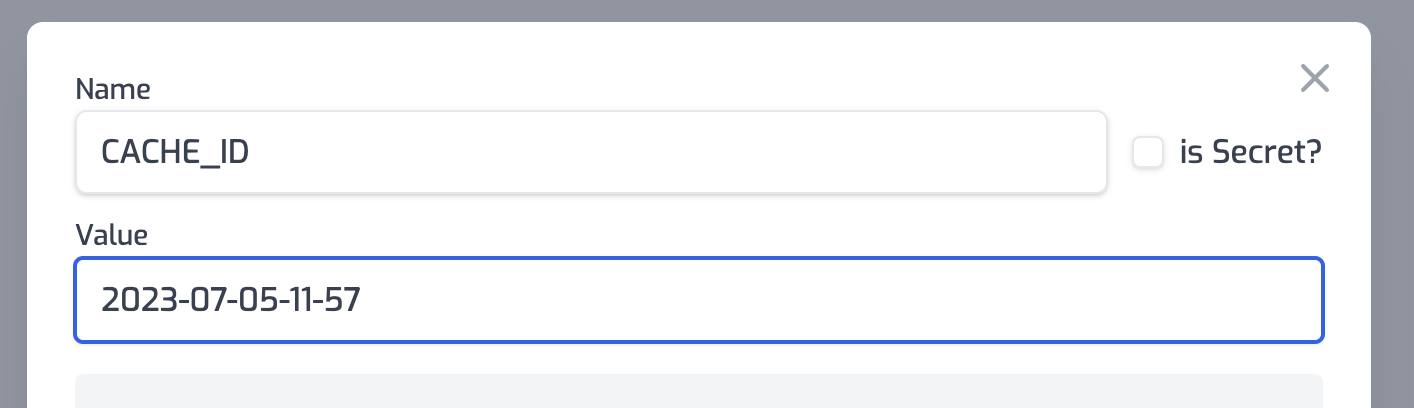
Then you would setup an env var for this, we recommend using the current date it
was set, e.g. `2023-07-05-11-57` and then simply change this value and trigger a
redeploy to bust your cache.
### Additional Cache-Busting Strategies
#### Using Environment Variables
The recommended approach for cache-busting is to use an environment variable for
the `cachedId` option:
1. Set up an environment variable (e.g., `CACHE_ID`) with a value that includes
a timestamp
2. Configure your policy to use this variable: `"cachedId": "$env(CACHE_ID)"`
3. When you need to invalidate all cached responses:
- Update the environment variable value (e.g., to the current timestamp)
- Trigger a redeploy of your API
#### Using Query Parameters
For more targeted cache-busting, you can instruct clients to include a version
or timestamp query parameter in their requests. Since query parameters are part
of the cache key by default, this will result in a cache miss and a fresh
response.
## Best Practices
1. **Identify Cacheable Endpoints**: Focus on caching endpoints that:
- Receive frequent identical requests
- Return responses that don't change frequently
- Have computationally expensive backend operations
2. **Set Appropriate TTLs**: Balance freshness against performance:
- Too short: Underutilizes caching benefits
- Too long: Risks serving stale data
3. **Use Cache-Busting Wisely**: Have a strategy for invalidating caches when
data changes unexpectedly
4. **Monitor Cache Performance**: Keep track of cache hit rates and response
times to optimize your caching strategy
5. **Consider Security Implications**: Be careful with caching authenticated
responses, especially when they contain user-specific data
## Common Use Cases
- **Public Data Endpoints**: Weather data, stock prices, public statistics
- **Product Catalogs**: Product listings, category pages, search results
- **Content Delivery**: Blog posts, documentation, static assets
- **API Responses**: Third-party API responses that don't change frequently
## Limitations
- The policy only caches successful responses (status codes 200-299)
- Very large responses may not be suitable for caching
- Streaming responses are not cached
## Security Considerations
By default, the Authorization header is included in the cache key to ensure that
cached responses are only served to users with the same authorization level. If
you set `dangerouslyIgnoreAuthorizationHeader` to `true`, the Authorization
header will be ignored when generating the cache key.
**Warning**: Setting `dangerouslyIgnoreAuthorizationHeader` to `true` could
potentially expose sensitive data to unauthorized users if your responses
contain user-specific information. Only use this option when you're certain that
the cached responses don't contain user-specific or sensitive information.
## Troubleshooting
If you're experiencing issues with the caching policy:
1. **Responses Not Being Cached**:
- Verify the request method is cacheable (GET, HEAD are most common)
- Check that the response status code is in the 200-299 range
- Ensure the request doesn't include headers that vary the response but
aren't included in your cache key
2. **Cache Not Being Invalidated**:
- Verify your cache-busting strategy is working correctly
- Check that the `cachedId` is being updated properly
- Confirm that your TTL settings are appropriate
3. **Unexpected Behavior**:
- Review which headers are included in your cache key
- Check if `dangerouslyIgnoreAuthorizationHeader` is set correctly for your
use case
- Verify that query parameters that should affect caching are properly
included in requests
Read more about [how policies work](/articles/policies)